

Ergonomic Workstation Design: Reduce Worker Fatigue and Improve Productivity
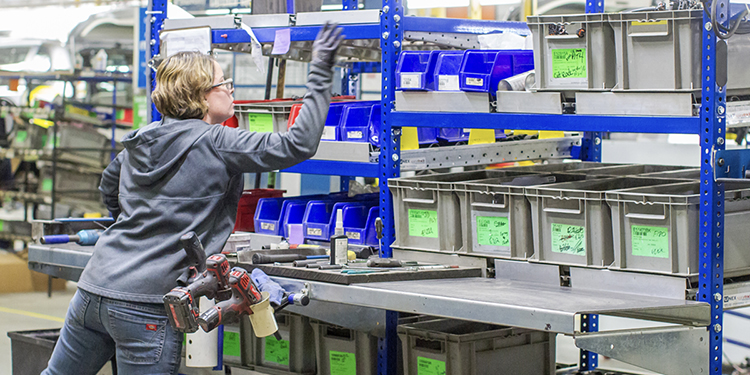
Industrial operations frequently rely on employees performing repetitive tasks for extended periods of time. Whether assembling products, picking orders, or processing materials, workers often remain at a single workstation throughout much of their shift. Without proper ergonomic workstation design, these environments can contribute to worker fatigue, discomfort, and injuries that ultimately reduce productivity.
Yet ergonomic workstation design is not simply about comfort. Organizations that design their workstations around the worker and the task experience improved efficiency and reduce strain simply by creating safer, more productive environments. Further, ergonomic improvements often deliver measurable operational benefits as well, noted Megan Baker, Director of Marketing at UNEX. The company is a member of the Ergonomic Assist Systems & Equipment (EASE) Council.
“Companies often think ergonomics only matters after someone gets hurt,” Baker said. “In reality, ergonomic workstation design improves the way work gets done. When tasks are easier to perform, employees move more efficiently and maintain productivity throughout their shifts.”
Why Ergonomic Workstation Design Matters

Workstation design plays a critical role in industrial ergonomics because it shapes how employees interact with tools, materials, and equipment. Poorly designed workstations can force workers to bend, reach, twist, or strain repeatedly throughout the day. Over time, these awkward postures increase the risk of musculoskeletal disorders (MSDs), including back, shoulder, and wrist injuries.
The EASE Council’s educational guide, Industrial Ergonomics 101: An Introduction to Ergonomics in Industrial and Supply Chain Environments explains that effective workstation design focuses on aligning the physical workspace with both the worker’s body and the demands of the task. When these factors are balanced properly, employees can perform their work safely while maintaining high levels of productivity.
“Small design changes can make a huge difference,” Baker explained. “If workers have to constantly reach for tools or adjust their posture to see what they’re doing, those movements add up over an entire shift.”
Adjustable Workstations Reduce Strain
One of the most effective components of ergonomic workstation design is the use of adjustable equipment. According to Industrial Ergonomics 101, adjustable-height workbenches allow users to raise or lower the surface to suit their height and the task at hand.
Without adjustability, employees may have to bend over low work surfaces or raise their arms above shoulder level to perform tasks. Both situations create unnecessary strain. Adjustable workstations allow employees to maintain a neutral posture, reducing fatigue and improving comfort.
“Every worker is different,” Baker explained. “Adjustable workstations ensure the equipment adapts to the person—not the other way around.”
Proper Tool Placement Improves Efficiency
Another important aspect of ergonomic workstation design is the positioning of tools and materials. Tools should be located within easy reach so employees can access them without stretching, twisting, or leaning.
Keeping frequently used tools within the primary reach zone minimizes unnecessary movement and reduces strain on muscles and joints. It also improves productivity by allowing workers to complete tasks more quickly.
“Think about how much time is wasted when workers constantly reach for tools or materials,” Baker said. “Optimizing tool placement not only improves ergonomics—it streamlines the workflow.”
Smart Equipment Layout Reduces Reaching and Bending
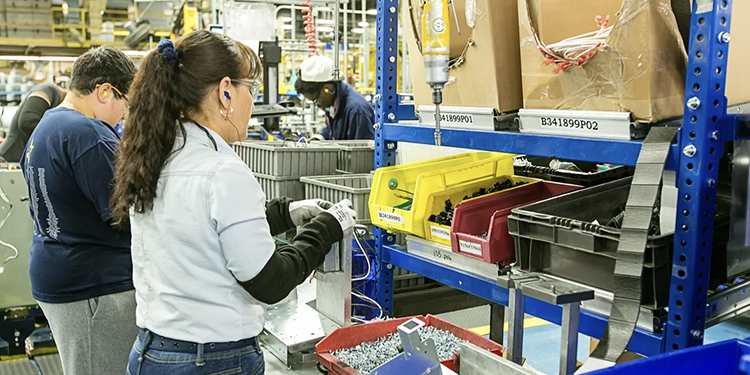
Beyond tool placement, the overall layout of equipment within a workstation also affects ergonomics. Components, containers, and supplies should be positioned to support smooth workflow and minimize awkward movements.
When equipment is poorly arranged, employees may repeatedly reach across their body or bend down to retrieve items. These movements increase fatigue and slow the process.
Instead, ergonomic workstation design organizes tools and materials to support a logical sequence of tasks. This allows employees to move naturally from one step to the next while maintaining a comfortable posture.
“Designing a workstation is really about designing the workflow,” Baker said. “If the layout matches the task sequence, workers don’t waste time or energy moving unnecessarily.”
Lighting Plays a Critical Role in Ergonomics
Lighting is another essential element of ergonomic workstation design that is often overlooked. Poor lighting can force employees to lean closer to their work or adjust their posture to see clearly.
According to Industrial Ergonomics 101, effective workstation lighting should eliminate glare and shadows while providing adequate illumination for the task. Both ambient lighting and task lighting should be considered when designing the workspace.
“Good lighting supports good posture,” Baker explained. “When workers can see clearly, they don’t need to strain or lean in awkward positions to complete their tasks.”
Ergonomic Workstations Support Long-Term Productivity
Ergonomic workstation design ultimately benefits both employees and employers. By reducing physical strain, companies can lower injury risk, improve worker comfort, and maintain consistent productivity throughout the shift.
Over time, these improvements contribute to fewer injuries, reduced absenteeism, and higher employee satisfaction.
“Ergonomics isn’t just about safety. It’s also about performance,” Baker concluded. “When workstations are designed with ergonomics in mind, workers stay energized and productive all day.”
Find More Ergonomics Resources from the EASE Council
Looking for more ways to improve ergonomics in your facility? Consult with the members of the Ergonomic Assist Systems & Equipment (EASE) Council. The association recently published Industrial Ergonomics 101: An Introduction to Ergonomics in Industrial and Supply Chain Environments. Additionally, the EASE Council offers a variety of presentations and seminars, checklists, and ergonomic articles on their website.

